The problem
Our design system has grown sophisticated, and the performance cost has grown with it. Opening a complex Figma file means slow loading and input lag, and a task that should take three minutes turns into a lot of waiting.
A recent project had several designers working in separate files, with their screens exported into one end-to-end flow. We keep the files separate on purpose, because smaller files stay fast and are easier to review. The cost was that someone had to keep opening the heavy files just to export PNGs for the overview. After a few rounds of iteration, I was spending about 60% of my day waiting for Figma to load.
Linked PNGs
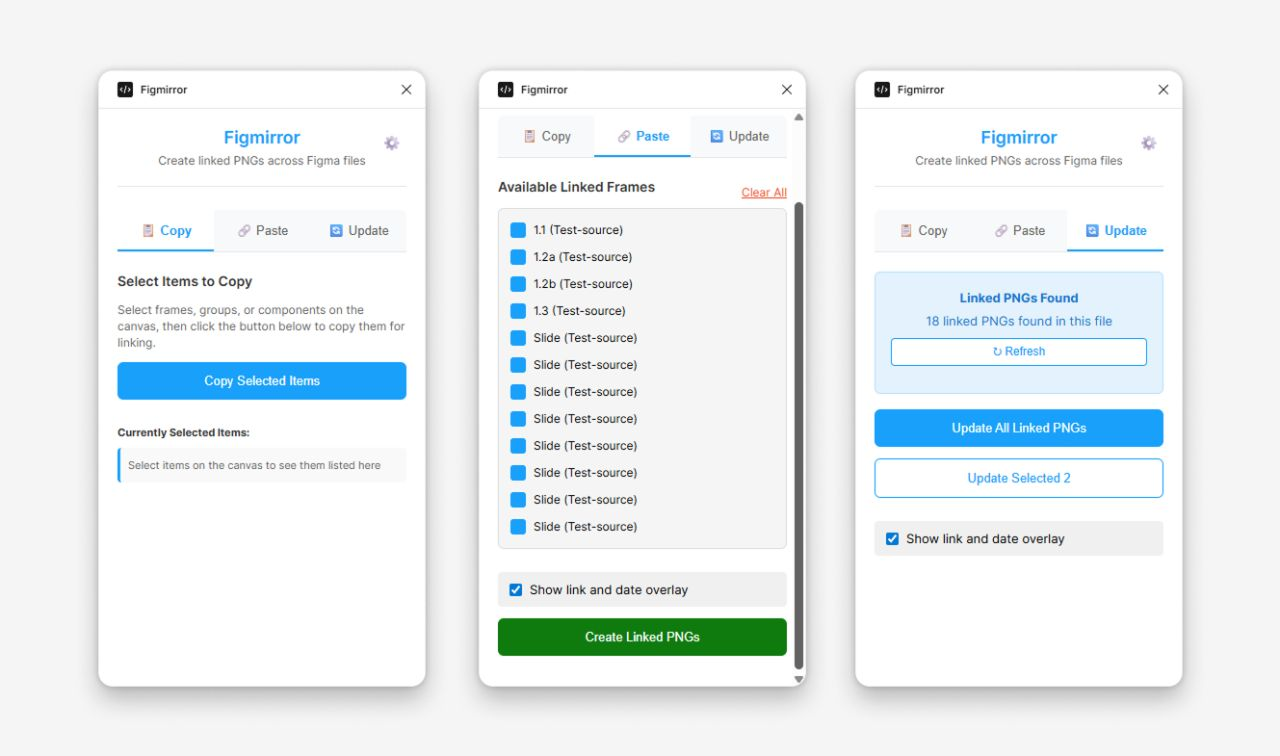
So I tried building a plugin with GitHub Copilot. Figmirror lets you copy frames, groups, or components in one file and paste them into another as PNGs that stay linked to their source.
- Copy: select items on the canvas and copy them for linking.
- Paste: pick from the available linked frames and place them as PNGs, optionally with an overlay showing the source link and the date it was captured.
- Update: find every linked PNG in the file, then refresh them all at once or only the ones you've selected. The plugin renders new images from the latest version of each source.
The overview file no longer needs anyone to open the source files to stay current. The timestamp shows how fresh each image is, and updating is one click.
What surprised me
I know very little about code. The plugin worked after about two days, and a few more hours of refinement followed, based on feedback from the team.
It was a simple case of having a problem and fixing it, which AI-assisted development made possible for a designer. These tools will only get better from here. If a repetitive workflow is draining your time, it may be worth trying to build your own fix. It has never been easier to start.
See Figmirror in the gallery ↗